iOS / macOS app
PocketGarage · die-cast collection
Version 1.1.0 for iPhone and iPad is available in supported App Store regions
A small-scale die-cast collection app with photo cut-outs, barcode duplicate checks, a wishlist and spending totals by currency. Version 1.1.0 is available for iPhone and iPad in supported regions, with refreshed collection screens, packaging cut-outs and custom scales. Use it without an account or opt into private iCloud sync.
Overview
- Duplicate check — scan the barcode on the package in a shop, or type a part number or name, and it tells you right away "not yet / you have N / on your wishlist"; adding a car warns about duplicates too
- Guided capture — it shoots from further back on the telephoto lens to cut distortion, hints at level and distance, fires automatically once you hold still, and can walk you round six sides of the car
- Cut-outs and backgrounds — two passes for a cleaner edge, depth to drop clutter behind the car and finger touch-ups; 15 backgrounds plus six themed scenes such as the Green Hell and a 24-hour race at night, all made on the device
- The garage ceremony — the plinth lights up, the car drops onto it from above, a thin light sweeps over it and a nameplate shows its name and plate before it arcs back to its own card; rare cars get a champagne-gold sweep, with haptics and no sound
- Number plates drawn like real ones — proportions, pressed edges, screws and stamped characters, in 17 styles; German, Italian, French, British, Swiss and Korean plates unlock once you own three cars from that country's brands, and every car can wear its own
- Collecting with a sense of occasion — stats styled like F1 telemetry, a dream garage of dark display cases, season check-ins and 32 blister-card achievements
- Type
- iOS / macOS app
- My role
- Design · development
- Date
- 2026.11
- Status
- In progress
- Privacy policy
- Privacy policy
Screenshots
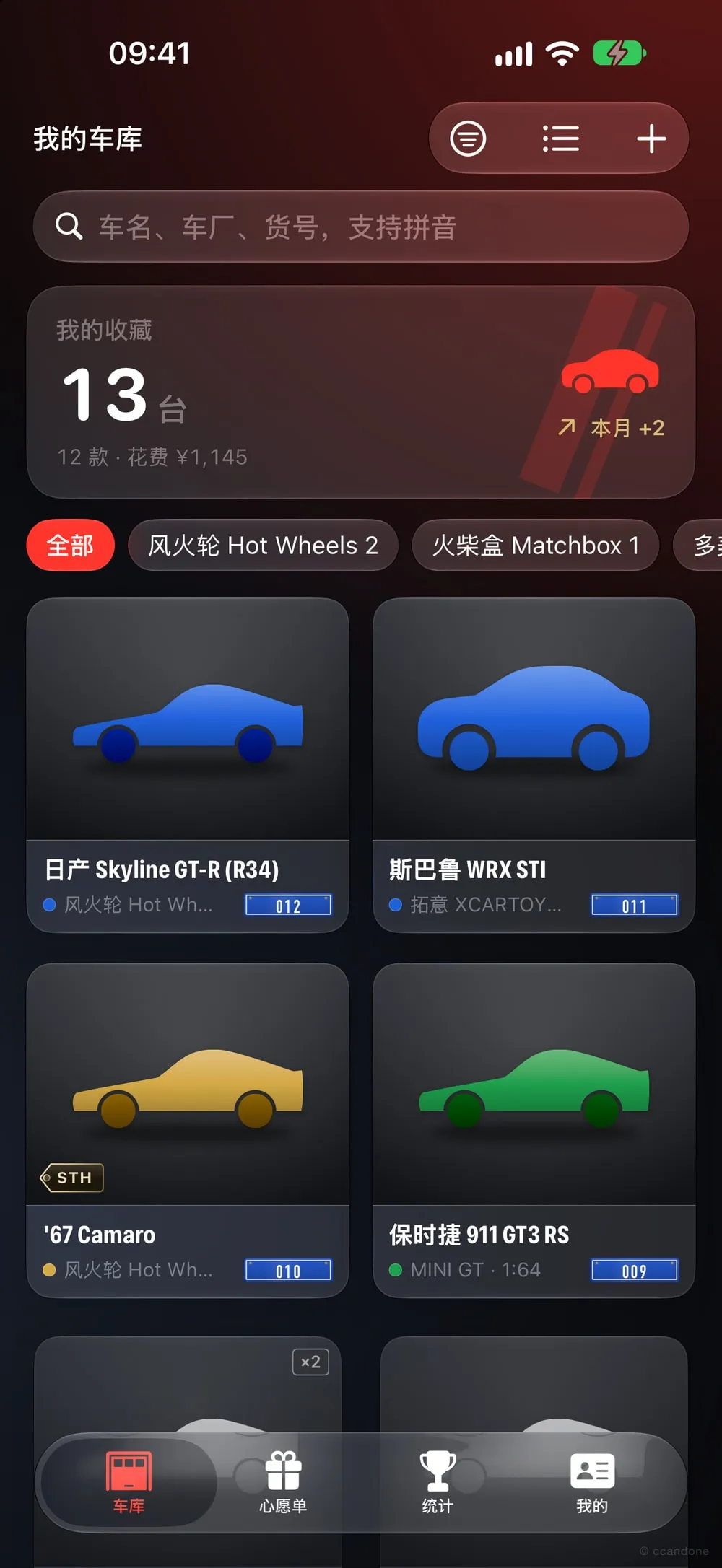
Garage: overview card, brand chips and the car grid 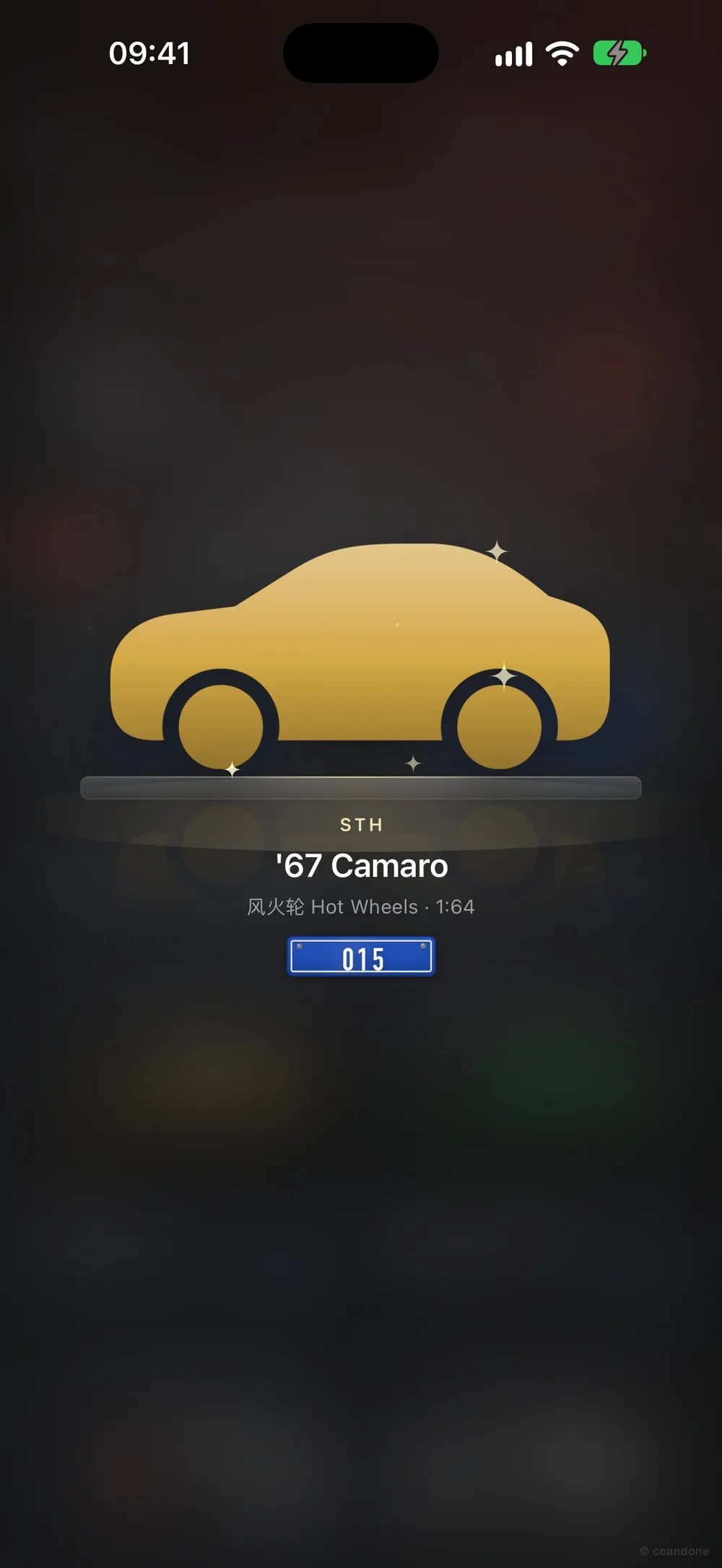
A rare car arrives: it settles on a glass plinth and the nameplate shows its plate 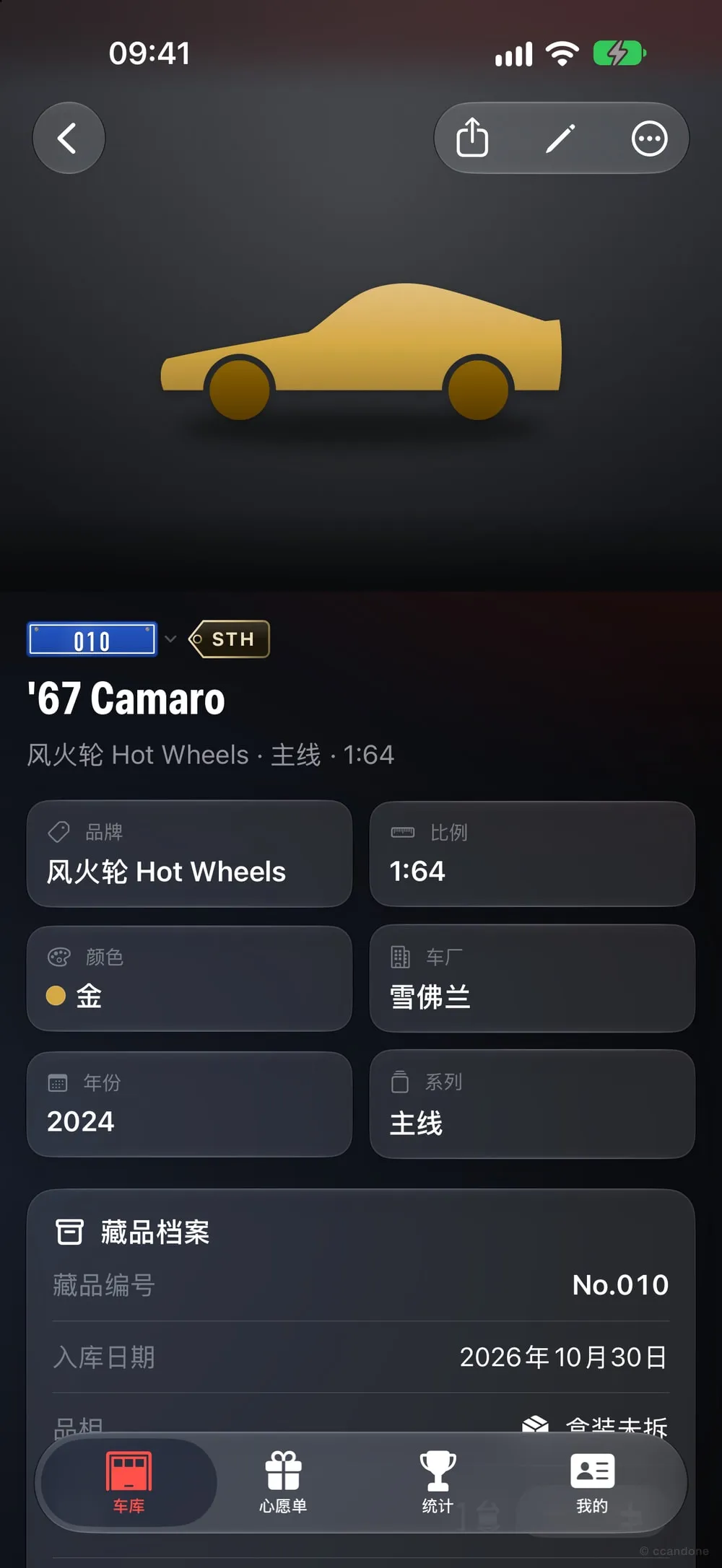
Details: the redrawn plate, a metal-edged STH tag and the collection record 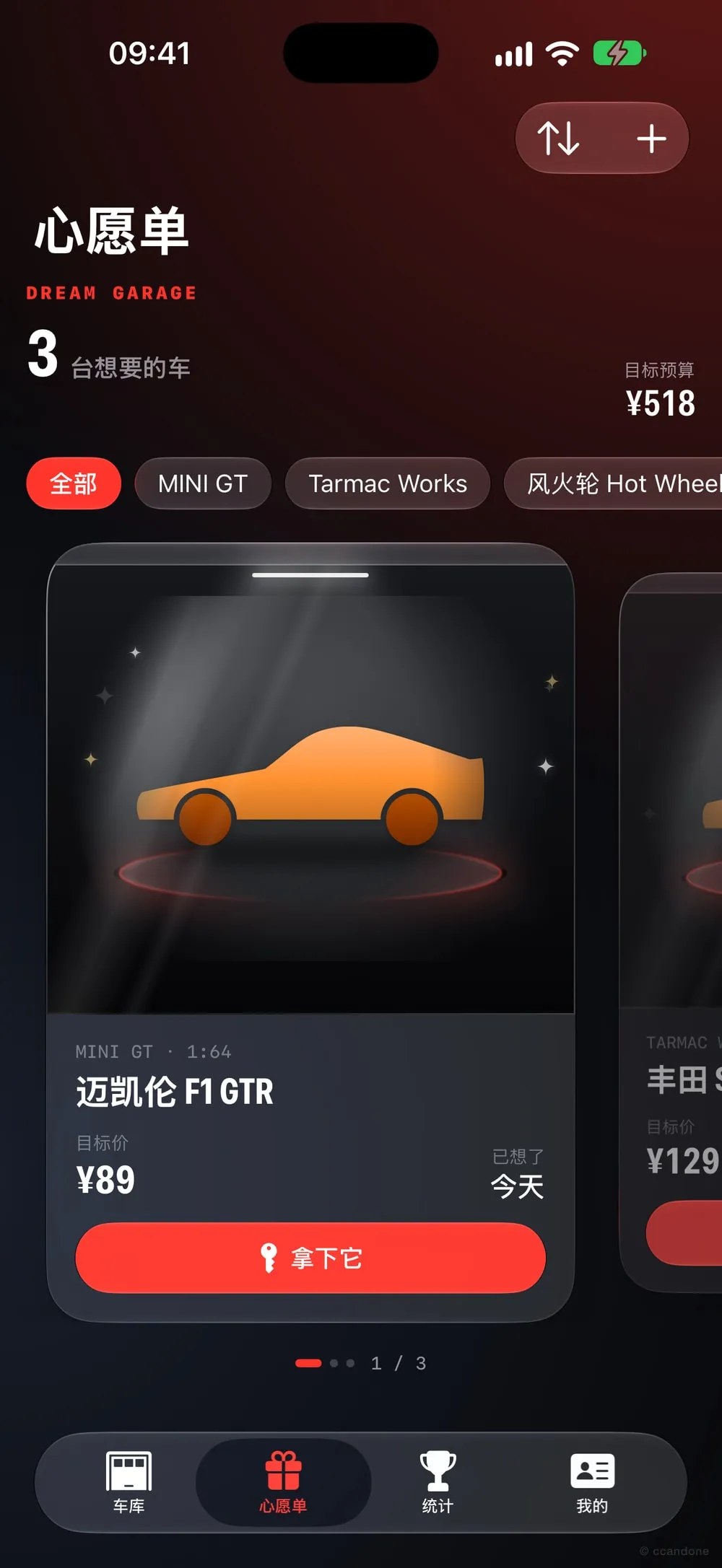
Dream garage: swipe through the cars you want in dark display cases 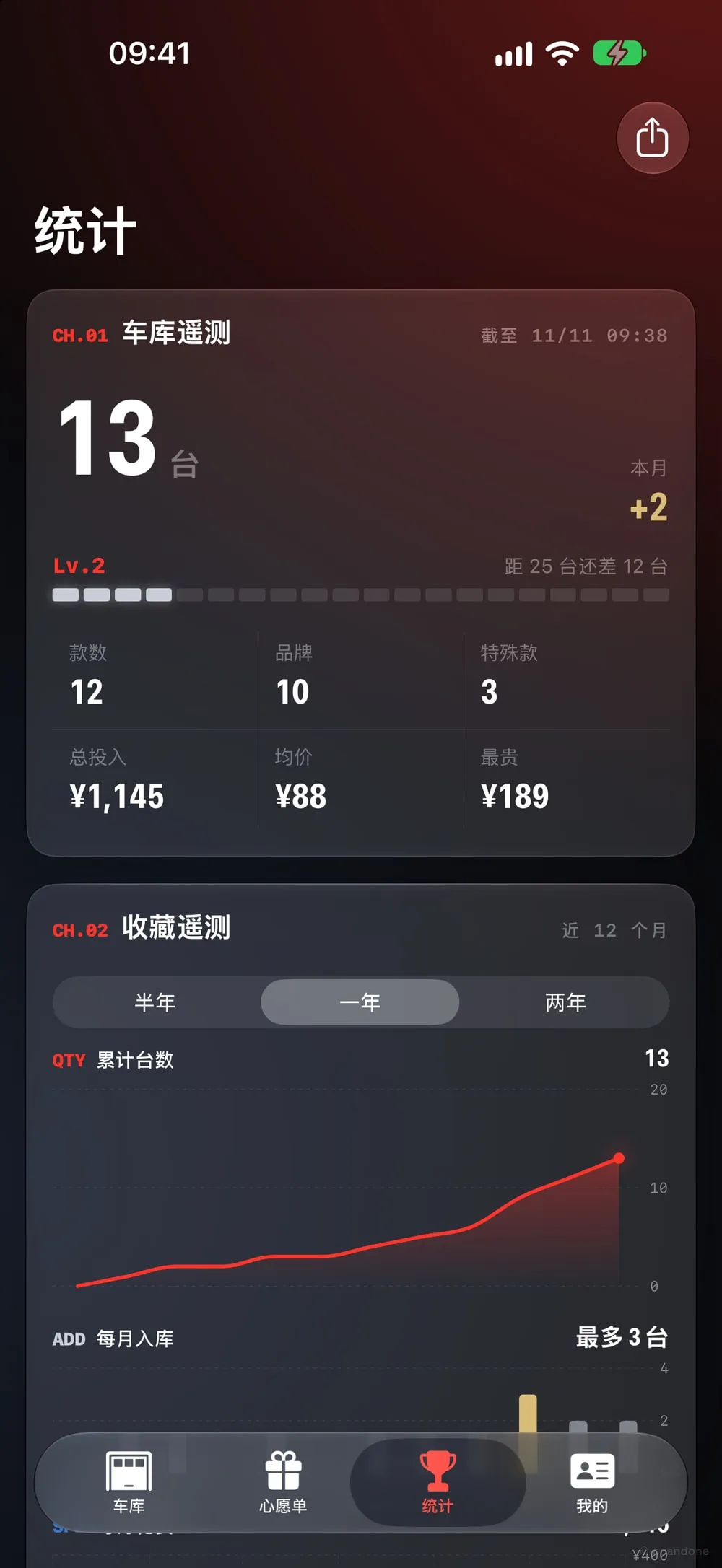
Stats: telemetry readouts, levels and traces in paint colours
Screenshots from the iOS Simulator. Tap one to see it full size.
Why I’m building it
I collect 1:64 die-cast cars myself, and once there are enough of them I forget what I have: I see one I like in a shop and can’t remember whether I already bought it. The collection apps out there are mostly in English and lean towards Hot Wheels and the US market, with little love for Asian brands like Tomica, MINI GT or XCARTOYS.
So I’m making a Chinese-first “digital garage”: quick to add cars, a duplicate check for the shop, and the feeling of cars lined up in a display case.
What it does
- Garage: grid or list, filter by brand, scale, condition, special marks (STH / TH / RLC and so on) and whether there’s a photo, seven sort orders (including garage number); select several to delete or change brand in one go, and undo a delete within 5 seconds; search names, series, makers, part numbers, barcodes, colours and notes, in full pinyin or initials (
fhlfinds 风火轮, Hot Wheels). - Guided capture: the built-in viewfinder shoots from further back on the telephoto lens (up to 3×) to avoid close-up distortion, says “back off a little” or “level it”, and fires after you hold still for 0.9 seconds. It can also walk you round the left, right, front, rear, top and bottom one at a time, or just a few of them.
- Cut-outs: two passes, first to find the car and then again cropped in close, for a cleaner edge; when a photo has depth it also drops clutter in the background. You can touch up the edge with a finger or cut it out by hand from scratch. When it’s composited, the edge is softened, a little backlight shows through, the wheels blend into the ground, and a reflection and vignette hide small flaws.
- Backgrounds: 15 of them, such as plinth grey, graphite with red light, Nardo grey, carbon fibre, a glass cabinet, a bayshore tunnel and white or black studios; plus six themed scenes (the Green Hell, a 24-hour race at night, a harbour street circuit, a bayshore parking area, a snow rally and a Lunar New Year special), full scenes with depth of field that appear once you unlock their achievement or buy them. The original is always kept.
- Adding cars: up to nine photos each (multi-select from Photos, the camera, or drag and drop on the Mac), with brand, series, maker, year, scale, colour, part number, barcode, quantity, price, purchase date and where you bought it. Colours can be combined (a red-and-white livery, say), there’s an “Other” brand, and special marks follow each brand’s own naming. It remembers your last brand and shop, and “save and add another” makes batches quick.
- Duplicate check: before saving it warns about a car you already have, with “add 1 to the existing one” as an option; in a shop, scan a barcode or type a part number or name to see the answer, then add it to the garage or wishlist in one tap.
- Dream garage (wishlist): the cars you want sit in dark display cases you swipe through, with a top light and a sheen along the body; target prices, a budget total, and one tap moves a car into the garage when you buy it, dated that day, without treating the target price as what you paid.
- Stats: styled like F1 telemetry in paint colours, over six months, a year or two years, with live readouts and a shift-light level, three traces for total cars, monthly additions and monthly spending, and a brand timing tower.
- Profile: 33 team-livery avatars; daily check-ins with shift lights and a tail-light trail calendar; 32 achievements (six of them hidden) hung on a pegboard; unlockable titles, avatar frames, 17 number plates, photo backgrounds and nine paint colours for the app icon.
- Plates and marks: number plates are redrawn after real ones, with their proportions, pressed edges, screws and stamped characters, and each style has its own typeface and number format; new German, Italian, French, British, Swiss and Korean plates unlock once you own three cars from that country’s brands. Every car can have its own plate, and special marks like STH are now metal-edged hang tags.
- First launch: a short tour, a privacy note and a backup reminder.
- Backup and restore: one file holds every car, photo and profile detail for moving to a new device. Backups stream to disk, so lots of photos won’t fill memory, and a restore only swaps in the new data once it’s fully written, so a failure or a forced quit halfway leaves your old data intact.
- Share cards: a dark card for one car or the whole garage’s stats, made only when you tap share.
- Three platforms: a tab bar on iPhone; a sidebar on iPad and Mac with an extra browse-by-brand section; menu shortcuts on the Mac.
The garage ceremony
A new car shouldn’t just get a “saved” message; it should feel like placing it in a display case. The first version pulled off a car cover, revved the engine and drove into the garage. After watching it a few times it felt too loud, so on 8 November I rebuilt it as a quiet display case, and on 11 November reworked the timing and the plates again:
- Lights: the background frosts over and dims, and the glass plinth lights up first.
- Settling in: the car drops onto the plinth from above, with a click from the haptics. A cut-out car goes on the plinth as just the car, without its old background.
- Sweep and nameplate: a thin line of light passes over the body, the car’s name and plate fade in one after the other, and the car arcs back to its own card in the garage.
- Rare ones like STH or limited editions get a champagne-gold sweep with a scatter of sparkles and three extra taps; a car bought from the wishlist says “Wish come true” on its nameplate.
- Milestones (1, 10, 25, 50, 100…) use the same display-case stage, dressed up a little more.
- The short version no longer covers the whole screen; it just plays lightly in the garage.
- There’s no sound, only haptics. The full version plays the first time each day and a two-second short version after that, while rare cars, wishlist buys and milestones always get the full one; a tap skips it, and Settings can make it always full, always short or off. With Reduce Motion on, it simply fades.
Privacy
- The collection stays on your device by default and works without an account. If you enable private iCloud sync, your collection and photos go to your own private iCloud storage.
- Sign in with Apple is optional. The sign-in service handles the information needed to create and manage an account. Cut-outs are processed on the device.
- Export CSV or a full backup with photos. Privacy policy
Tech
- Swift 6, SwiftUI and SwiftData, iOS / iPadOS 18 and macOS 15 and later, with one codebase building the iPhone, iPad and Mac apps.
- Barcodes are scanned live with VisionKit or read from a photo with Vision; guided capture uses AVFoundation and the gyroscope to judge angle and steadiness; cut-outs use Vision’s subject lifting plus depth; full-size photos are stored as external files with cached thumbnails, so a big garage still scrolls smoothly.
- Pinyin search, duplicate checks, filtering, sorting and stats live in their own logic layer, with 76 unit tests in Swift Testing, including backup round trips, a restore failing halfway without data loss, and CSV formula injection.
- Every animation runs off one timeline, and the haptics follow the same script through Core Haptics; a car without a photo gets a silhouette by body type (saloon, sports car, SUV, convertible or truck, guessed from the name) in its paint colour, and you can pick the type by hand.
- The app icon is drawn by a script: a GT3 race car in profile with a shaft of light, in nine paint colours you can switch between in Settings. Neither the name nor the icon uses any die-cast brand’s trademark.
- iCloud sync is enabled separately and uses the same system iCloud account on devices where sync is turned on.
Progress
- Garage, adding cars, duplicate checks, shop scanning, wishlist, stats, share cards
- iPhone, iPad and Mac
- Garage ceremony, milestone animation, app icon
- Tested scanning, photos and sharing on a real iPhone
- Cut-outs, telemetry stats, dream garage, check-ins and achievements, backup and restore
- Completed internal TestFlight testing
- Guided capture, six-side walkaround, cut-out touch-ups, the display-case ceremony and themed scenes
- Plates redrawn after real ones, six countries’ plates, a plate per car, undoable deletes, batch actions and a first-launch tour
- 1.0.0: local collection without an account, optional Sign in with Apple and private iCloud sync
- 1.1.0: refreshed Garage, Wishlist, Stats and Profile, plus packaging cut-outs, manual selection and touch-ups, 1:60 and custom scales. App Store (US)
- CSV import, reading part numbers off the card, home screen widgets